Skip to content

Learn

Measure what Meta, Google and Amazon Ads return

Put Meta, Google and Amazon Ads spend next to the revenue they brought, on your website and on Amazon, and see the return of each campaign.

Updated

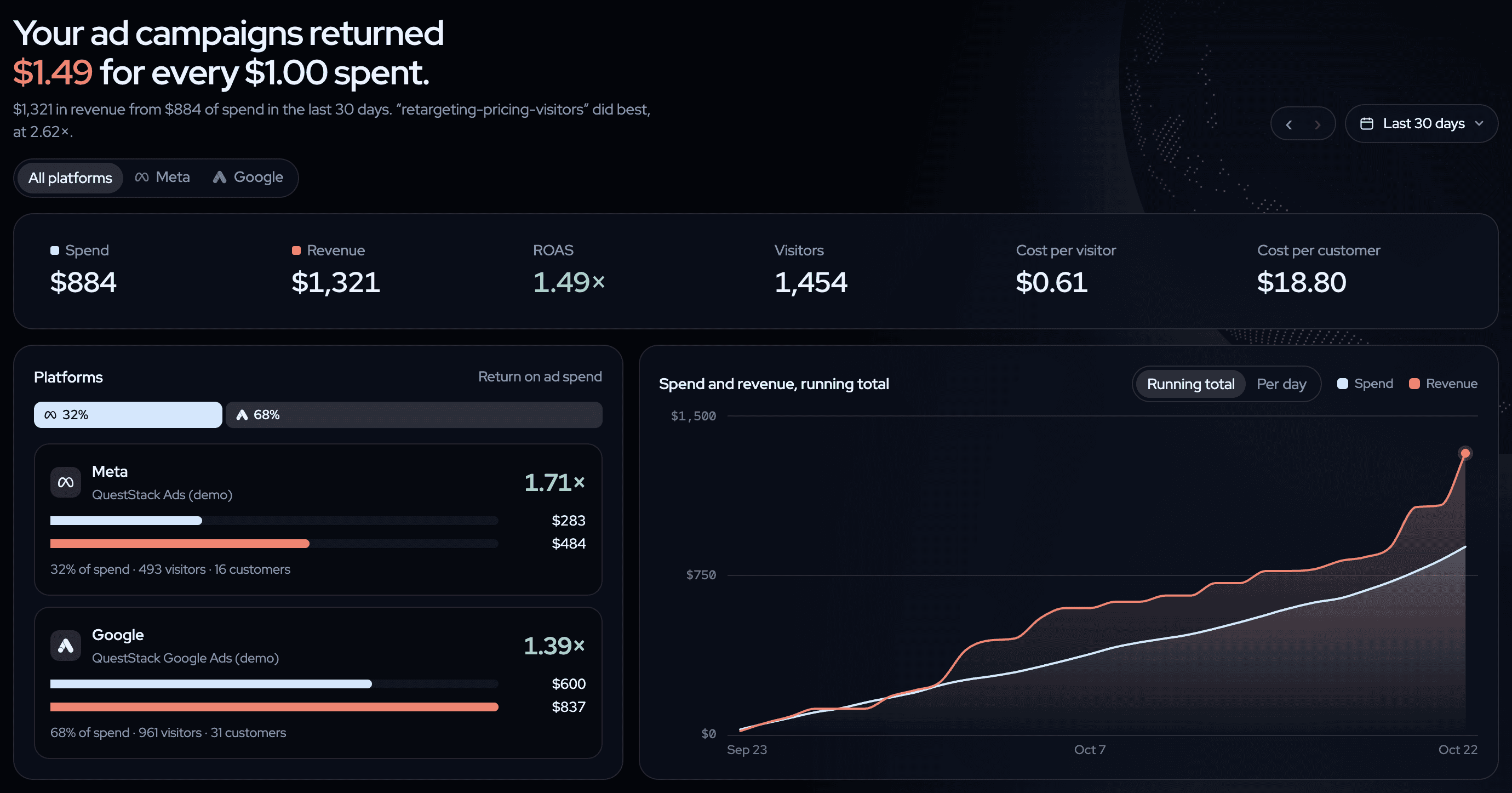
The twelvebit Ads page: your ad campaigns returned $1.49 for every $1.00 spent; spend $884, revenue $1,321; Meta returned 1.71× and Google 1.39×, with a running total of spend and revenue.
The Ads page: what the campaigns returned for each dollar, here with spend from Meta and Google. Sample data on the queststack.io demo, October 2026. Open the live demo →

Why the ad platform's number is not enough

Meta, Google and Amazon each report the sales that they think they caused. Two platforms can count the same buyer, and each one uses its own window. The sum is more than your revenue. To see what each dollar returned, the spend must sit next to the payments that your provider recorded, credited once.

Where twelvebit shows it

The Ads page starts with one sentence: "Your ad campaigns returned $X for every $1.00 spent." The tiles show spend, revenue, ROAS, visitors, cost per visitor and cost per customer. ROAS is revenue divided by spend, so 1× means that the ads paid for themselves.

With more than one platform connected, the Platforms card compares them. The campaigns table shows spend, clicks, visitors, customers, revenue and ROAS for each campaign. Website revenue is last touch, and customers counts first payments only.

Amazon Ads works a little differently, because the sale happens on Amazon. Amazon reports the orders that its ads brought within 14 days of a click, as totals for each campaign, and twelvebit shows those totals and says that they come from Amazon. The Amazon page adds your Amazon sales with and without ads, and one return for every ad: Meta, Google and Amazon spend against website and Amazon revenue together.
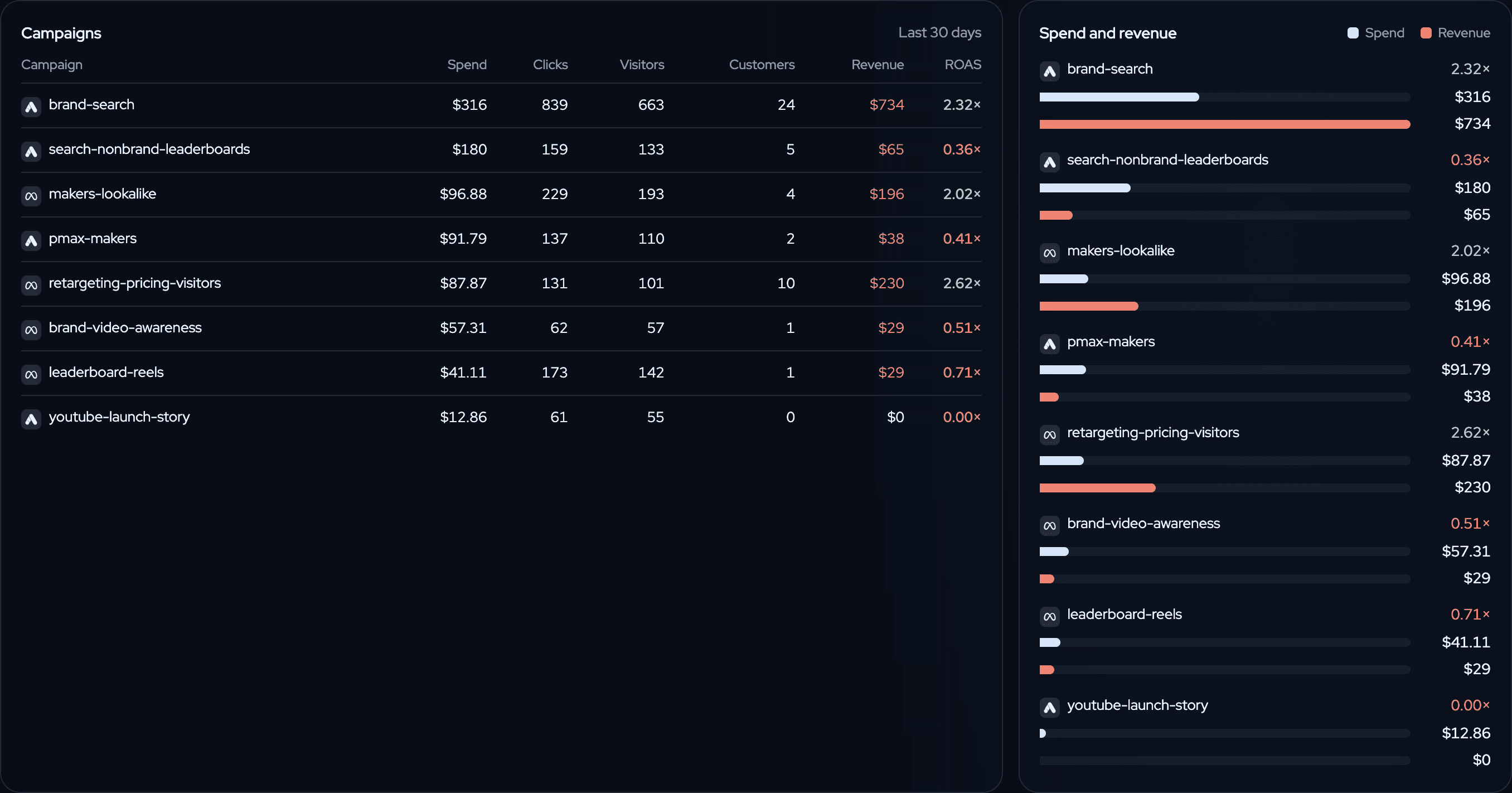
Meta and Google campaigns in one table with spend, clicks, visitors, customers, revenue and ROAS: brand-search 2.32×, retargeting-pricing-visitors 2.62×, makers-lookalike 2.02×.
Campaigns from Meta and Google in one table, with spend, customers, revenue and ROAS. Sample data on the queststack.io demo, October 2026. Open the live demo →

How to do it

  1. Connect your payment provider first. Without revenue there is no return to show.
  2. Meta Ads: in Settings → Integrations, paste a long-lived token with ads_read and your ad account id. Add UTM tags to your ads, with the campaign id in utm_campaign.
  3. Google Ads: in Settings → Integrations, click Get the script, paste it in Google Ads under Tools → Bulk actions → Scripts, and set it to run every hour. Keep auto-tagging on, so that each click carries a gclid. The first run loads 120 days. See the Google Ads docs.
  4. Amazon Ads: in Settings → Revenue → Amazon, click Sign in with Amazon to connect your seller account, then Connect Amazon Ads. twelvebit only reads: it never changes a campaign, a budget or a bid.
  5. Open Ads. Use the platform switch to see one platform alone.

What to do with the answer

Move budget from campaigns below 1× to the campaigns with the highest return. Look at cost per customer next to your plan price, because a campaign can pay back over a few months of a subscription. Before you stop a campaign with many visitors, check its funnel: the ad may be fine and the landing page weak.

Keep learning

More questions the dashboard answers.

  • Measure the revenue from SEO

    Connect Google Search Console and see clicks, position and estimated revenue for each keyword and page, next to the revenue Organic Search brings.

  • Measure the revenue from X and Reddit posts

    See each post on X, Reddit and Hacker News that names your site on the chart, with the visitors and revenue it sent.

  • Watch a launch day live

    See who is on your site now, where they came from and who looks ready to buy, on a live list and a globe, and tag the launch so you can measure it later.

All learn pages →

Paste one prompt. Watch the first events arrive.

Start free. Your agent does the setup, and you see revenue next to the traffic that brought it.

14-day free trial · cancel any time