Skip to content

Stripe revenue attribution

See which traffic sources bring Stripe customers.

Join Stripe payments to the visits that brought them. See revenue by channel, campaign and landing page, including renewals and refunds. Your coding agent can do the setup.

Updated

From payment to source

Revenue belongs next to the traffic that brought it.

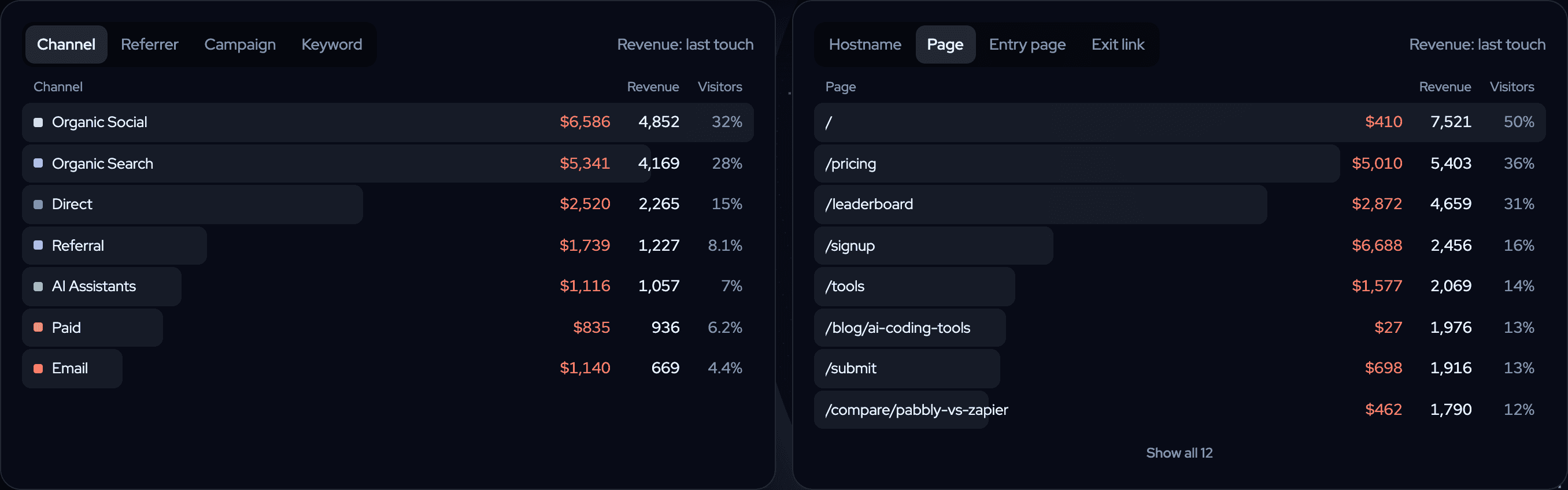
Compare channels and landing pages, then open the visits before a payment. The screenshot below uses demo data.

Two twelvebit report cards: revenue and visitors by channel (Organic Social $6,586, Organic Search $5,341, Direct $2,520) and by page (/signup $6,688, /pricing $5,010), with last-touch revenue.
Example data: visitors and last-touch revenue by channel and page, in the public demo. Screenshot of the live demo, October 2026. Open the live demo →

Explore the live demo →

Set up once

Three steps from Stripe to a revenue report.

  1. Track visits and the actions that matter

    Add twelvebit to your site, or paste the setup prompt into your coding agent. Visits carry the referrer, campaign and landing page; your tracking plan names actions such as signups and checkout starts.

  2. Connect Stripe and carry the visit into checkout

    Connect Stripe in your site's revenue settings. For a checkout created on your server, pass the twelvebit visitor and session IDs in its metadata. Subscription metadata keeps the IDs available for renewals.

  3. Read payments next to their source

    twelvebit reads payments, renewals and refunds from the connected provider. Open revenue by channel, campaign or landing page, then inspect a customer's visits when you need the detail.

Let your coding agent install it →Follow the Stripe setup guide →

Next.js example

Carry the visitor into your existing checkout.

In cookie mode, read _tb_vid and _tb_sid on your server and put them on the Stripe Checkout Session. For a subscription, also put them on subscription_data.metadata. This excerpt assumes your existing Stripe client, validated price and redirect URLs.

Next.js · server-side subscription checkout excerpt
// Add this to your existing server-side Stripe checkout.
// Keep your authentication, validated price and redirect URLs.
import { cookies } from "next/headers";

const jar = await cookies();
const visitor = jar.get("_tb_vid")?.value;
const session = jar.get("_tb_sid")?.value;
const ids = {
  ...(visitor && { twelvebit_visitor_id: visitor }),
  ...(session && { twelvebit_session_id: session }),
};

const checkout = await stripe.checkout.sessions.create({
  mode: "subscription",
  line_items: [{ price: validatedPriceId, quantity: 1 }],
  success_url: successUrl,
  cancel_url: cancelUrl,
  metadata: { ...ids, plan: "pro" },
  subscription_data: { metadata: { ...ids, plan: "pro" } },
});

For a one-time payment, use mode: payment and payment_intent_data.metadata instead of subscription_data. Receive payment revenue through the connected provider; do not send the same payment again through the payments API. The full Stripe guide explains the integration.

Beyond the first sale

Follow the payment lifecycle.

How Stripe payments, renewals and refunds get attributed
What happensHow the link worksWhat to check
First paymentThe session or visitor IDs join a payment to a visitRead its channel, campaign, referrer and landing page
A customer returns before payingLast touch credits the visit before the paymentSwitch the Revenue page to first touch to compare the first visit
A subscription renewsCheckout/subscription metadata or the customer's earlier attributed payment helps keep the linkRead renewals separately from new payments
A payment is refundedThe refund counts against the credited visitCompare gross payments, refunds and net revenue in the same range
No visit can be matchedA payment has no attributable visitCheck the checkout metadata and tracking before calling the source Direct

A worked example

A $49 payment and a $10 refund leave $39 net.

Illustrative example · USD · 1–30 October 2026 · last-touch attribution

Someone follows a newsletter link tagged utm_source=newsletter and utm_campaign=launch, starts checkout and pays $49 in the same visit. Stripe sends the payment with the twelvebit IDs. A $10 refund in the same reporting range subtracts from that visit, leaving $39 net revenue credited to the newsletter and launch campaign.

If the person returns through a different source before paying, last touch can credit that later visit. The Revenue page can switch to first touch to show the original visit. These are rules for assigning credit, not proof that a campaign caused a sale. See the attribution model.

Check the setup before relying on the numbers

  1. Confirm that visits and the expected goals arrive from your production domain.
  2. Inspect a checkout's metadata: the visitor and session IDs should be present when tracking is allowed.
  3. Compare a received payment and refund with Stripe, using the same currency and date range. Open the credited visit to check its source.

Production connections require a live-mode Stripe restricted key by default; test keys need an explicitly enabled test setup. Use the troubleshooting guide if a visit, payment or refund is missing.

Before you connect

What to expect from Stripe attribution.

Does it work with Stripe Payment Links?

Yes. Payment Links cannot receive your server's checkout metadata, but Stripe can redirect to a page on your site with session_id={CHECKOUT_SESSION_ID}. The twelvebit script can link that session to the visit. The visitor must reach the return page, and automatic payment linking must be enabled. See payments from the success page.

What changes in cookieless mode?

There are no twelvebit cookies for the server excerpt to read. A cookieless visitor ID changes daily, so cross-day returning-visitor attribution is limited. Consent choices, blockers, another browser or another device can also prevent a match. Read the privacy and cookieless documentation before choosing a setup.

Is this multi-touch attribution?

No. Each payment is credited to one visit. Channel and campaign reports use last touch; the Revenue page also offers first touch. twelvebit does not divide a payment between several visits.

Can my agent read the reports?

Yes. Connect the analytics MCP server and ask which channels or landing pages brought Stripe customers, with a site and date range. Read-only access is the default; connecting MCP does not itself install tracking or connect Stripe.

Which plan includes Stripe revenue attribution?

Every paid plan includes revenue attribution, funnels, journeys and MCP. Starter starts at $9 a month for 10k events. Start with a 14-day trial, with no card. Compare plans and usage or twelvebit and DataFast before you choose.

Paste one prompt. Watch the first events arrive.

Start free. Your agent does the setup, and you see revenue next to the traffic that brought it.

14-day free trial · cancel any time